
NewgenONE Platform
AI-first User Interface Designer
Rapidly design, build, and deliver responsive, enterprise-grade web and mobile interfaces using intuitive, point-and-click configurability. With GenAI-guided design and full-stack composition, teams can create consistent, scalable user experiences across devices—accelerating delivery while maintaining enterprise standards.

Enterprise User Interface Design with Visual and AI-assisted Development
Design, build, and deliver responsive, enterprise-grade web and mobile interfaces through point-and-click, visual development tools. Enable business users to participate in full-stack application creation, ensuring consistent experiences across devices while maintaining enterprise standards and governance.
AI-first User Interface Designer Capabilities on NewgenONE
AI-assisted Template-based UI Development


Intelligent, Responsive and Adaptive Enterprise Portals
Reusable Visual Components and Intelligent Controls
Interactive and Intelligent Survey Experiences
Enterprise-grade Accessibility and Localization
AI-powered Conversational Chatbots
AI-assisted Template-based UI Development
- Enable point-and-click application development for web and mobile to accelerate UI creation and reduce development cycles
- Leverage predefined, AI-driven UI templates to compose rich, intuitive, and user-friendly enterprise applications faster
Intelligent, Responsive and Adaptive Enterprise Portals
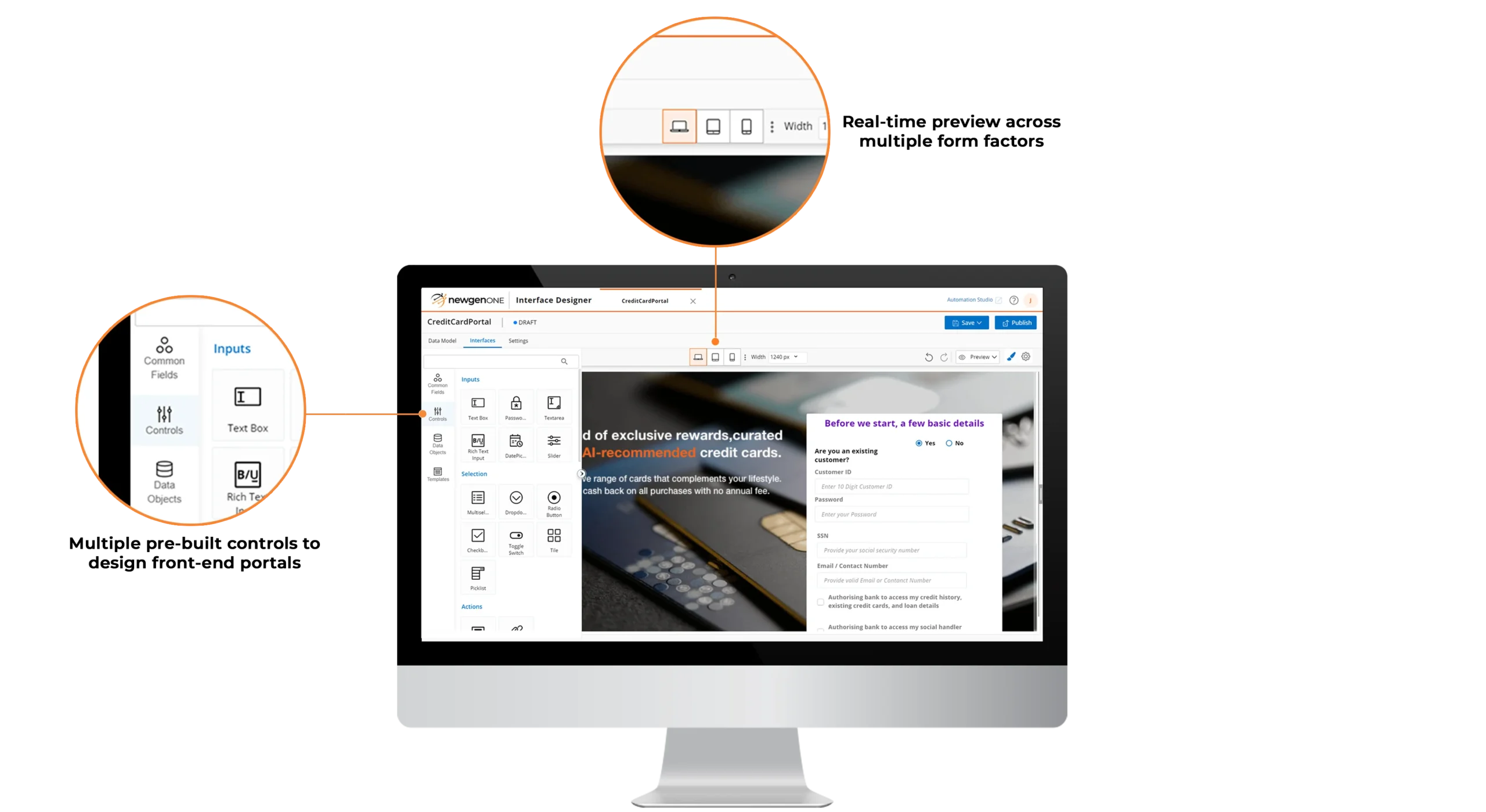
- Design interfaces using a WYSIWYG visual UI designer with real-time previews, making the UI development process more intuitive and efficient
- Build React-based responsive interfaces that support a design once, render anywhere approach across multiple form factors
- Enable dynamic loading of sections, sub-forms, and UI controls based on device type for optimized performance and usability
- Create progressive web applications (PWAs) to deliver a seamless, app-like experience across both web and mobile platforms
Reusable Visual Components and Intelligent Controls
- Reuse forms, sub-forms, sections, and widgets across portals and business processes to improve consistency and speed
- Apply pre-built, portal-ready UI controls to maintain a consistent look and feel across enterprise applications
- Use a data model–driven design approach to eliminate rework by reusing data objects across portals and processes without redefining models and forms
- Gain insights through AI-powered analytics that provide a 360-degree view of aggregated data with advanced visualizations and intelligent report generation
- Clone user-defined UI themes across applications to ensure adherence to enterprise brand and design guidelines
Interactive and Intelligent Survey Experiences
- Create interactive surveys using multiple input formats such as star ratings, multi-choice selections, and structured responses
- Deliver personalized survey journeys using dynamic question branching to improve data relevance and response quality
Enterprise-grade Accessibility and Localization
- Enable multi-lingual application support to localize user experiences across regions and global user bases
- Ensure compliance with Web Content Accessibility Guidelines (WCAG 2.1) to support inclusive and accessible digital experiences
AI-powered Conversational Chatbots
- Build AI-powered chatbots using point-and-click visual development tools with configurable, pre-built themes
- Preview and test chatbot user interfaces using ready-to-use visual themes for faster validation and deployment
- Apply AI/ML-driven sentiment and context analysis to interpret conversations and deliver more personalized, efficient interactions
AI-assisted Template-based UI Development

- Enable point-and-click application development for web and mobile to accelerate UI creation and reduce development cycles
- Leverage predefined, AI-driven UI templates to compose rich, intuitive, and user-friendly enterprise applications faster
Intelligent, Responsive and Adaptive Enterprise Portals
- Design interfaces using a WYSIWYG visual UI designer with real-time previews, making the UI development process more intuitive and efficient
- Build React-based responsive interfaces that support a design once, render anywhere approach across multiple form factors
- Enable dynamic loading of sections, sub-forms, and UI controls based on device type for optimized performance and usability
- Create progressive web applications (PWAs) to deliver a seamless, app-like experience across both web and mobile platforms
Reusable Visual Components and Intelligent Controls
- Reuse forms, sub-forms, sections, and widgets across portals and business processes to improve consistency and speed
- Apply pre-built, portal-ready UI controls to maintain a consistent look and feel across enterprise applications
- Use a data model–driven design approach to eliminate rework by reusing data objects across portals and processes without redefining models and forms
- Gain insights through AI-powered analytics that provide a 360-degree view of aggregated data with advanced visualizations and intelligent report generation
- Clone user-defined UI themes across applications to ensure adherence to enterprise brand and design guidelines
Interactive and Intelligent Survey Experiences
- Create interactive surveys using multiple input formats such as star ratings, multi-choice selections, and structured responses
- Deliver personalized survey journeys using dynamic question branching to improve data relevance and response quality
Enterprise-grade Accessibility and Localization
- Enable multi-lingual application support to localize user experiences across regions and global user bases
- Ensure compliance with Web Content Accessibility Guidelines (WCAG 2.1) to support inclusive and accessible digital experiences
AI-powered Conversational Chatbots
- Build AI-powered chatbots using point-and-click visual development tools with configurable, pre-built themes
- Preview and test chatbot user interfaces using ready-to-use visual themes for faster validation and deployment
- Apply AI/ML-driven sentiment and context analysis to interpret conversations and deliver more personalized, efficient interactions
Low-Code Application Development Capabilities of NewgenONE Platform





Success Stories



Lead with an Industry-recognized Platform



Recommended For You











All you need to know about User Interface Designer
Front-end API architecture refers to the design patterns and structures used to connect the user interface of a web application with the back-end API. It determines how data is fetched, managed, and displayed in the user interface. The choice of front-end API architecture affects an application’s performance, scalability, and maintenance.
NewgenONE supports the back-end for front-end application architecture, allowing seamless user interaction irrespective of the platform where the front-end application is running. With It is focused on improving the user experience by providing a tailored backend API for each frontend interface.
User interface design can be used to create a consistent brand identity by incorporating consistent visual elements, typography, color palette, and imagery across all digital touchpoints. By establishing a recognizable and memorable visual language, a brand can create a strong identity. This can be achieved by using a consistent color palette and typography, aligning visual elements with brand values, and utilizing imagery that supports the brand’s tone and message.
Responsive design is crucial for user interface design because it allows interfaces to adapt to different screen sizes and device types, ensuring a consistent experience across all devices. By considering the user’s device and screen size, designers can create interfaces that are user-friendly and accessible.
