
NewgenONE Platform
AI-first Low-code DevOps
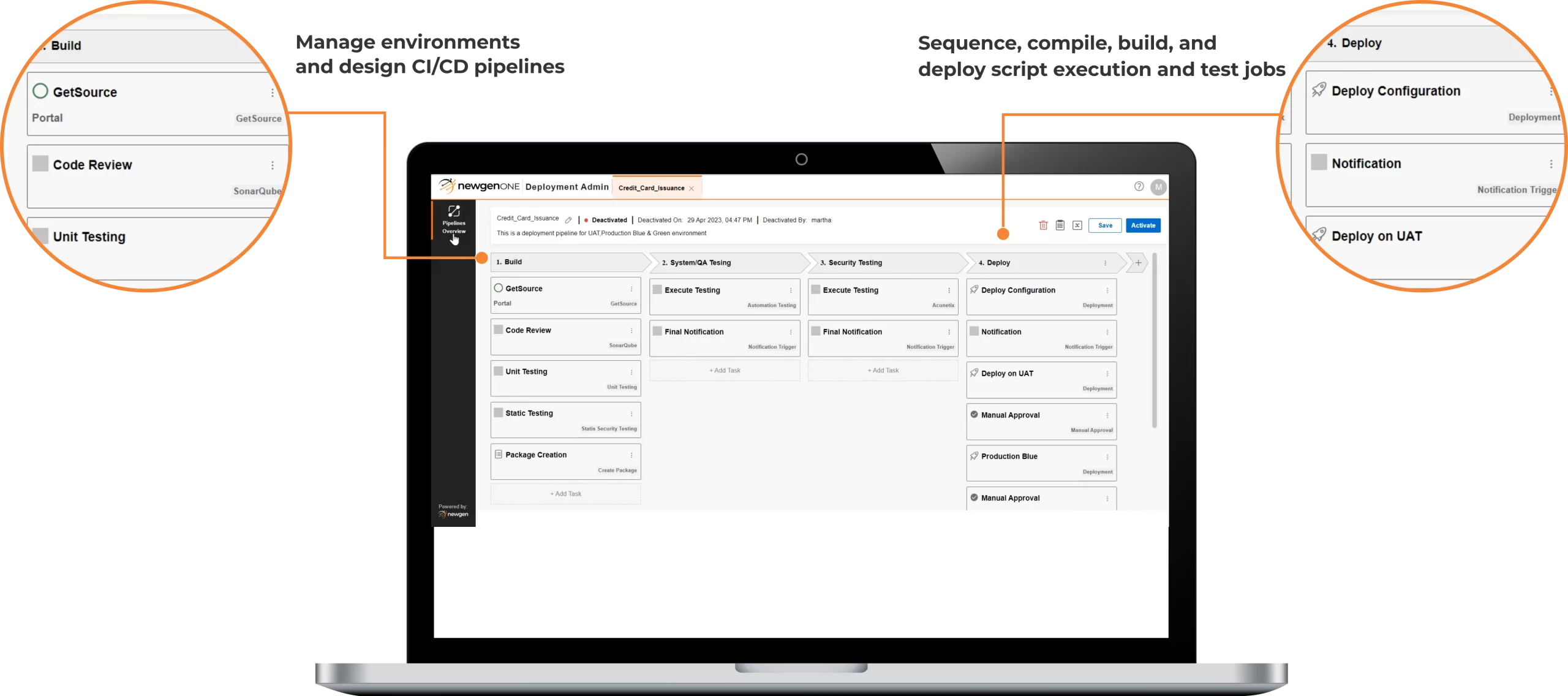
Optimize the enterprise DevOps lifecycle with AI-powered, low-code automation that enables seamless CI/CD, real-time pipeline monitoring, and rapid deployments. With a user-friendly, visual pipeline designer, teams can orchestrate builds, releases, and deployments faster, accelerating application development while maintaining control, reliability, and scale.

How does low-code DevOps enable continuous integration, deployment, and real-time release control?
Low-code DevOps enables continuous integration and deployment by allowing teams to configure and run automated CI/CD pipelines for application artifacts using a comprehensive DevOps toolset. It accelerates the DevOps lifecycle by streamlining the delivery of features, fixes, and updates, reducing delays across application development and release stages. Changes can be implemented and deployed instantly through a visual, user-friendly pipeline designer that simplifies orchestration across build, test, and deployment phases. With real-time pipeline monitoring, teams gain immediate visibility into deployment progress and performance. Applications can be deployed seamlessly on Amazon Web Services (AWS) and Microsoft Azure, supporting scalable, cloud-ready enterprise environments.
Enterprise-grade DevOps Capabilities on the NewgenONE Platform
Intelligent and Seamless DevOps Lifecycle Management


Simplified and Governed Application Deployment
Flexible Deployment Across Enterprise Environments
AI-powered Dashboards for DevOps Reporting and Analysis
Intelligent and Seamless DevOps Lifecycle Management
- Enable faster application deployment and higher-quality delivery through rapid code changes, automated testing, and streamlined CI/CD workflows for developers
- Integrate AI-driven testing, validation, and verification at multiple stages of the application lifecycle to proactively detect anomalies and support error-free releases
- Enforce governed pipeline execution with role-based access controls and user rights management
- Orchestrate platform and external APIs seamlessly to simplify development, integration, and deployment across complex enterprise environments
Simplified and Governed Application Deployment
- Support a wide range of enterprise application types, including portals, progressive web applications, mobile apps, processes, business rules, and reports, through an AI-automated, end-to-end deployment pipeline
- Provide a user-friendly interface for predefined system roles such as IT administrators, release managers, and DevOps engineers, with flexibility to define custom roles aligned to organizational structures
- Enable artifact versioning, automated backup, and restore capabilities to ensure controlled, reliable, and auditable application deployments
Flexible Deployment Across Enterprise Environments
- Enable seamless on-premises, cloud, and hybrid deployments, giving organizations the flexibility to manage applications across diverse infrastructure landscapes
- Leverage an AI-assisted, intuitive pipeline designer to manage multiple deployment environments with real-time insights into pipeline health and execution status
AI-powered Dashboards for DevOps Reporting and Analysis
- Monitor application performance using AI-powered dashboards that deliver actionable insights across the DevOps lifecycle
- Gain real-time visibility into pipeline execution, helping teams identify bottlenecks, risks, and optimization opportunities early
- Track and analyze historical pipeline executions to support performance analysis, compliance audits, and continuous improvement
Intelligent and Seamless DevOps Lifecycle Management

- Enable faster application deployment and higher-quality delivery through rapid code changes, automated testing, and streamlined CI/CD workflows for developers
- Integrate AI-driven testing, validation, and verification at multiple stages of the application lifecycle to proactively detect anomalies and support error-free releases
- Enforce governed pipeline execution with role-based access controls and user rights management
- Orchestrate platform and external APIs seamlessly to simplify development, integration, and deployment across complex enterprise environments
Simplified and Governed Application Deployment
- Support a wide range of enterprise application types, including portals, progressive web applications, mobile apps, processes, business rules, and reports, through an AI-automated, end-to-end deployment pipeline
- Provide a user-friendly interface for predefined system roles such as IT administrators, release managers, and DevOps engineers, with flexibility to define custom roles aligned to organizational structures
- Enable artifact versioning, automated backup, and restore capabilities to ensure controlled, reliable, and auditable application deployments
Flexible Deployment Across Enterprise Environments
- Enable seamless on-premises, cloud, and hybrid deployments, giving organizations the flexibility to manage applications across diverse infrastructure landscapes
- Leverage an AI-assisted, intuitive pipeline designer to manage multiple deployment environments with real-time insights into pipeline health and execution status
AI-powered Dashboards for DevOps Reporting and Analysis
- Monitor application performance using AI-powered dashboards that deliver actionable insights across the DevOps lifecycle
- Gain real-time visibility into pipeline execution, helping teams identify bottlenecks, risks, and optimization opportunities early
- Track and analyze historical pipeline executions to support performance analysis, compliance audits, and continuous improvement
Low-Code Application Development Capabilities of NewgenONE Platform





Success Stories



Lead with an Industry-recognized Platform


Recommended For You












Analyst Reports
All you need to know about Low Code DevOps
NewgenONE facilitates the blue-green deployment model for containerized cloud deployments. It enables the operations team to run two identical production environments, where only one environment (blue) is live most of the time, whereas the other is idle (green). Once a new version of the software is available, it is moved to the green environment, and then the traffic is redirected from the blue environment to the green using the load balancer.
This capability benefits operations teams by enabling customers to switch from an old to a new version without downtime. Furthermore, it allows the blue environment to serve as a backup in case of any failure or disaster on the newly deployed green environment.
To integrate security into a DevOps workflow, you can embed security practices into each stage of the software development lifecycle. Also, use automated security testing tools and techniques, perform regular vulnerability assessments, and ensure compliance with industry security standards and regulations.
Automation plays a crucial role in DevOps by streamlining and automating manual and repetitive tasks, such as testing, building, and deployment. Also, enabling faster and more frequent releases, reducing errors and downtime, and improving the overall efficiency and quality of the software development process.
Yes. The NewgenONE Platform has a database for managing user data. It also supports a cloud-only deployment.
Common challenges of cloud deployment include data security and compliance, vendor lock-in, performance and availability, integration with existing systems, and the need for specialized skills and expertise.
To optimize cloud deployment for performance and scalability, it is important to use auto-scaling, load balancing, caching, and other optimization techniques. Monitoring and analyzing performance metrics, identifying bottlenecks, and making necessary changes are also crucial to achieve optimal performance and scalability in the cloud.
Yes, creating more staging environments for developers is possible beyond the standard provision. The platform offers flexible configuration options for multiple staging environments, facilitating seamless application development, testing, and deployment before going live on production.
Newgen’s low-code environment efficiently manages concurrent processes, allowing ongoing transactions to run on existing versions while new transactions seamlessly execute on updated versions, ensuring uninterrupted operations.
