
NewgenONE Platform
AI-first Process Modeling
Leverage an intuitive, GenAI-powered interface to design, visualize, and orchestrate enterprise-wide workflows with speed and precision, enabling faster automation, consistent execution, and scalable process governance.

Design both simple and complex business processes using a web-based, drag-and-drop process designer. Enable collaboration and faster decision-making through role-based, contextual views of each process. Automate end-to-end workflows by orchestrating seamless information flow across front-, middle-, and back-office operations.
AI-first Process Modeling Capabilities for Enterprise Workflows
Visual, Low-code Process Design and Orchestration
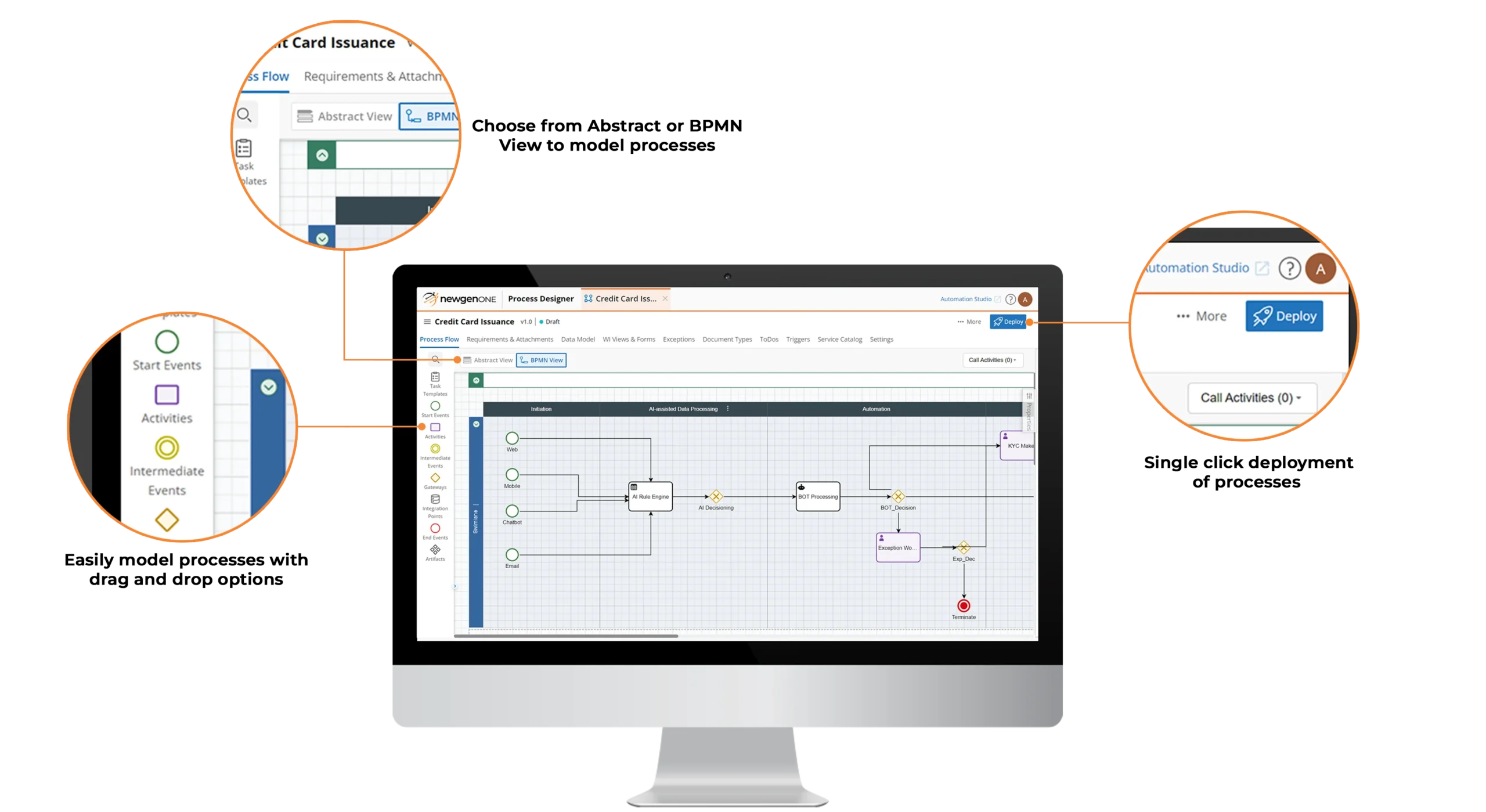
Visually design simple to complex process models with both abstract and BPMN views
Drag and drop process designer to create workflows while orchestrating data models, events, forms, documents, webservices, rules, users, and bots
Run-time exception handling to take charge of unexpected business scenarios
Library of templates to enable rapid process design
Intelligent Integrated Content Management
Content capturing from multiple devices, including multifunction printers, mobile devices, e-mails, fax, hot folders, scanners, and web
Data extraction from documents using advanced recognition technologies, such as OMR, ICR, MICR, barcode recognition, and others
Integrated document viewer interface to smoothly process document-centric workflows
AI-enabled Process Documentation
Requirements gathering at the project, process, and activity levels to eliminate the need for lengthy documents
Automatic creation of requirement specification document while designing the process
Enterprise Integration Framework with API-first Connectivity
Native support for REST and SOAP web services
Library of adaptors and standard APIs with ready-to-use integrations for industry applications
APIs for worksteps and process models to enable headless orchestration
Built-in Process Validation, Governance, and Version Control
Process validation for optimized and error-free processes
Version control across multiple processes and views for easier auditing and rollbacks
Intelligent Process Automation Capabilities of NewgenONE Platform



All you need to know about Process Modeling
Process modeling is a way to streamline workflows by creating an analytical and graphical representations of business processes. It involves data visualization where all process steps are mapped and configured to execute the desired flow.
Here are a few benefits of using process modeling:
- End-to-end visibility into processes
- Process improvement and agility
- Business orchestration and efficiency
- Standardization across departments
Process modeling helps enterprises continuously improve processes with a systematic approach and facilitate periodic testing of waters for course adjustment.
Process modeling software helps design simple and complex business processes using a web-based drag-and-drop process modeler, which provides different contextual views of each process to enable collaboration and consensus. It often serves as the layer for orchestrating user interfaces, data models, business rules, routing decisions, etc.
